Features
Invoices / Accounts Payable
By the Mylo team · Last updated June 30, 2026
The Invoices screen is your central bills ledger, what the business owes and whether it's been paid. At the top is an AP‑aging summary bucketed by how overdue each bill is (Not due / 1–30 / 31–60 / 61–90 / 90+ days), shown per currency (never FX‑summed). Below are status‑filter chips (Received, Approved, Scheduled, Overdue, Paid, Reconciled) and the list of bills.
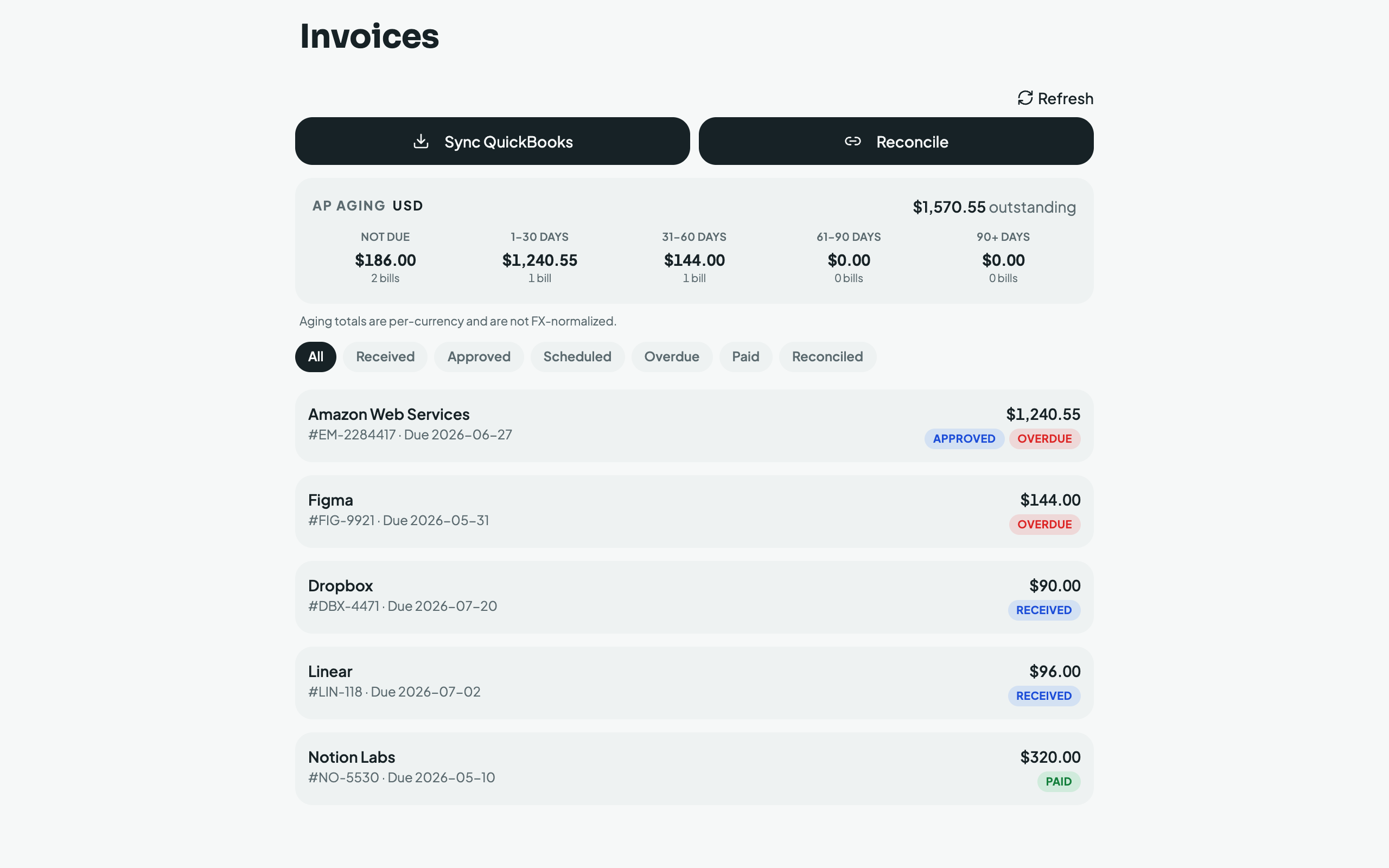
Bills come from three sources, deduplicated so the same bill arriving twice collapses into one row:
- QuickBooks: tap Sync QuickBooks to import bills, bill payments, and vendor credits.
- Email: tap Scan for invoices to sweep your connected inbox (30–365‑day look‑back) for invoices and reminders.
- Bank: tap Reconcile to match unpaid bills against your bank debits.
How reconciliation decides a bill is paid, conservatively. A candidate bank debit must clear several gates before Mylo will auto‑mark a bill paid:
- the amount matches exactly,
- the payment does not predate the invoice's issue date (plus a plausibility window),
- an AI judge agrees the debit settles that specific bill, and
- a deterministic clue corroborates it, a distinctive vendor token, or the invoice number appearing in the bank memo.
Only "AI says yes and corroboration succeeds" auto‑confirms. Anything weaker (a "maybe", or a "yes" with no corroborating clue) is stored as a potential match that you Confirm or Dismiss yourself, so a wrong payment is never booked silently.
Clean‑up tool (multi‑year backscan)
For a business (or an accountant's new client) whose books are behind, Mylo can run in clean‑up mode: connect the email inboxes, bank accounts and cards, and Mylo backscans years of history rather than only the recent window. Every email is split into its parts (body and each attachment judged separately), receipts and invoices are extracted, duplicate copies collapse into one entry (byte‑identical files, the same bill from several sources, and true twins by vendor + number + exact amount), and the strict reconciliation above matches documents to the payments that settled them. What's left is a short exception list, items that genuinely need a human answer: transactions with no document, documents with no payment, and personal‑vs‑business calls. For firms this turns clean‑up engagements into a connected‑accounts setup plus a review pass, instead of weeks of manual archaeology.